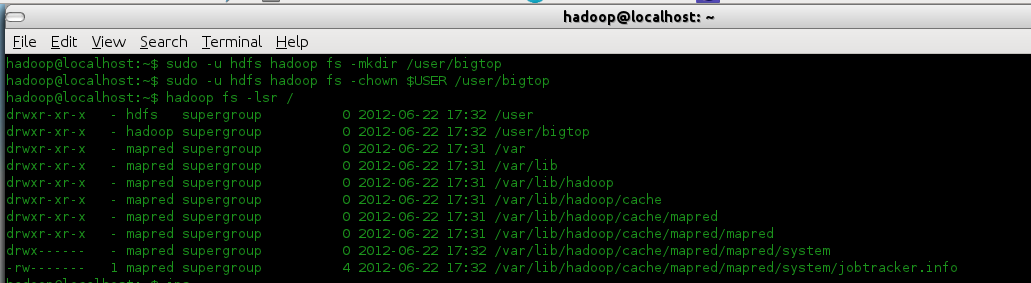
In the previous post we learnt how easy it was to install Hadoop with Apache Bigtop!
We know its not just Hadoop and there are sub-projects around the table! So, lets have a look at how to install Hive, Hbase and Pig in this post.
Before rowing your boat...
Please follow the previous post and get ready with Hadoop installed!
Follow the link for previous post:
http://femgeekz.blogspot.in/2012/06/hadoop-hangover-introduction-to-apache.html
also, the same can be found at DZone, developer site: http://www.dzone.com/links/hadoop_hangover_introduction_to_apache_bigtop_and.html
All Set?? Great! Head On..
Make sure all the services of Hadoop are running. Namely, JobTracker, SecondaryNameNode, TaskTracker, DataNode and NameNode. [standalone mode]
Hive with Bigtop:
The steps here are almost the same as Installing Hive as a separate project.
However, few steps are reduced.
The Hadoop installed in the previous post is Release 1.0.1
We had installed Hadoop with the following command
sudo apt-get install hadoop\*
Step 1: Installing Hive
We have installed Bigtop 0.3.0, and so issuing the following command installs all the hive components.
ie. hive, hive-metastore, hive-server. The daemons names are different in Bigtop 0.3.0.
sudo apt-get install hive\*
This installs all the hive components. After installing, the scripts must be able to create /tmp and /usr/hive/warehouseand HDFS doesn't allow these to be created while installing as it is unaware of the path to Java. So, create the directories if not created and grant the execute permissions.
In the hadoop directory, ie. /usr/lib/hadoop/
bin/hadoop fs -mkdir /tmp
bin/hadoop fs -mkdir /user/hive/warehouse
bin/hadoop -chmod g+x /tmp
bin/hadoop -chmod g+x /user/hive/warehouse
Step 2: The alternative directories could be/var/run/hiveand/var/lock/subsys
sudo mkdir /var/run/hive
sudo mkdir /var/lock/subsys
Step 3: Start the hive server, a daemon
sudo /etc/init.d/hive-server start
Image:
Step 4: Running Hive
Go-to the directory /usr/lib/hive.
See the Image below:
bin/hive
Step 5: Operations on Hive
Image:
HBase with Bigtop:
Installing Hbase is similar to Hive.
Step 1: Installing HBase
sudo apt-get install hbase\*
Image:
Step 2: Starting HMaster
sudo service hbase-master start
Image:
Image:
Step 3: Starting HBase shell
hbase shell
Image:
Step 4: HBase Operations
Image:
Image:
Installing Pig is similar too.
Step 1: Installing Pig
sudo apt-get install pig
Image:
Step 2: Moving a file to HDFS
Image:
Step 3: Installed Pig-0.9.2
Image:
Step 4: Starting the grunt shell
pig
Image:
Step 5: Pig Basic Operations
Image:
Image:
We saw that is it possible to install the subprojects and work with Hadoop, with no issues.
Apache Bigtop has its own spark! :)
There is a release coming BIGTOP-0.4.0 which is supposedly to fix the following issues:
https://issues.apache.org/jira/secure/ReleaseNote.jspa?version=12318889&styleName=Html&projectId=12311420
Source and binary files:
http://people.apache.org/~rvs/bigtop-0.4.0-incubating-RC0
Maven staging repo:
https://repository.apache.org/content/repositories/orgapachebigtop-279
Bigtop's KEYS file containing PGP keys we use to sign the release:
http://svn.apache.org/repos/asf/incubator/bigtop/dist/KEYS
Let us see how to install other sub-projects in the coming posts!
Until then, Happy Learning!! :):)
We know its not just Hadoop and there are sub-projects around the table! So, lets have a look at how to install Hive, Hbase and Pig in this post.
Before rowing your boat...
Please follow the previous post and get ready with Hadoop installed!
Follow the link for previous post:
http://femgeekz.blogspot.in/2012/06/hadoop-hangover-introduction-to-apache.html
also, the same can be found at DZone, developer site: http://www.dzone.com/links/hadoop_hangover_introduction_to_apache_bigtop_and.html
All Set?? Great! Head On..
Make sure all the services of Hadoop are running. Namely, JobTracker, SecondaryNameNode, TaskTracker, DataNode and NameNode. [standalone mode]
Hive with Bigtop:
The steps here are almost the same as Installing Hive as a separate project.
However, few steps are reduced.
The Hadoop installed in the previous post is Release 1.0.1
We had installed Hadoop with the following command
sudo apt-get install hadoop\*
Step 1: Installing Hive
We have installed Bigtop 0.3.0, and so issuing the following command installs all the hive components.
ie. hive, hive-metastore, hive-server. The daemons names are different in Bigtop 0.3.0.
sudo apt-get install hive\*
This installs all the hive components. After installing, the scripts must be able to create /tmp and /usr/hive/warehouseand HDFS doesn't allow these to be created while installing as it is unaware of the path to Java. So, create the directories if not created and grant the execute permissions.
In the hadoop directory, ie. /usr/lib/hadoop/
bin/hadoop fs -mkdir /tmp
bin/hadoop fs -mkdir /user/hive/warehouse
bin/hadoop -chmod g+x /tmp
bin/hadoop -chmod g+x /user/hive/warehouse
Step 2: The alternative directories could be/var/run/hiveand/var/lock/subsys
sudo mkdir /var/run/hive
sudo mkdir /var/lock/subsys
Step 3: Start the hive server, a daemon
sudo /etc/init.d/hive-server start
Image:
 |
| start hive-server |
Step 4: Running Hive
Go-to the directory /usr/lib/hive.
See the Image below:
bin/hive
 |
| bin/hive |
Step 5: Operations on Hive
Image:
 |
| Basic hive operations |
HBase with Bigtop:
Installing Hbase is similar to Hive.
Step 1: Installing HBase
sudo apt-get install hbase\*
Image:
 |
| hbase-0.92.0 |
Step 2: Starting HMaster
sudo service hbase-master start
Image:
 |
| Starting HMaster |
Image:
 |
| jps (HMaster started) |
Step 3: Starting HBase shell
hbase shell
Image:
 |
| start HBase shell |
Step 4: HBase Operations
Image:
 |
| HBase table operations |
Image:
 |
| list,scan,get,describe In HBase |
Installing Pig is similar too.
Step 1: Installing Pig
sudo apt-get install pig
Image:
 |
| Installing Pig |
Step 2: Moving a file to HDFS
Image:
 |
| Moving a tab separated file "book.csv" to HDFS |
Step 3: Installed Pig-0.9.2
Image:
 |
| Pig installed Pig-0.9.2 |
Step 4: Starting the grunt shell
pig
Image:
 |
| Starting Pig |
Step 5: Pig Basic Operations
Image:
 |
| Basic Pig Operations |
Image:
 |
| Job Completion |
We saw that is it possible to install the subprojects and work with Hadoop, with no issues.
Apache Bigtop has its own spark! :)
There is a release coming BIGTOP-0.4.0 which is supposedly to fix the following issues:
https://issues.apache.org/jira/secure/ReleaseNote.jspa?version=12318889&styleName=Html&projectId=12311420
Source and binary files:
http://people.apache.org/~rvs/bigtop-0.4.0-incubating-RC0
Maven staging repo:
https://repository.apache.org/content/repositories/orgapachebigtop-279
Bigtop's KEYS file containing PGP keys we use to sign the release:
http://svn.apache.org/repos/asf/incubator/bigtop/dist/KEYS
Let us see how to install other sub-projects in the coming posts!
Until then, Happy Learning!! :):)