Showing posts with label Install Hadoop. Show all posts

Monday, 11 February 2013

Hadoop Hangover: How-to launch a hadoop cluster CDH4 [MRv1 / YARN + Ganglia] using Apache Whirr


  This post is about how-to launch a CDH4 MRv1 or CDH4 Yarn cluster on EC2 instances. It's said that you can launch a cluster with the help of Whirr and in a matter of 5 minutes! This is very true if and only if everything works out well! ;) 

Hopefully, this article helps you in that regard.
So, let's row the boat...
  • Download the stable version of Apache Whirr  ie. whirr-0.8.1.tar.gz from the following link whirr-0.8.1.tar.gz
  • Extract from the tarball and generate the key 
  • Generate the key
  • Make a properties file to launch the cluster with that configuration.
  • Now let me tell you how to avoid getting headaches!
    • cluster name: Keep your cluster name simple. Avoid testCluster, testCluster1 etc. ie. No Caps, numerics..
    • Decide on the number of datanodes you want judiciously.
    • Your launch may not be successful, if java is not installed. Make sure the image has Java. However, this properties file takes care of that.
    • It will be good to go ahead with MRv1 for now and later switch to MRv2, when we get a production stable release.
    • This is the minimal set of configurations for launching a Hadoop cluster. But, you can do a lot performance tuning upon this.
    • I had launched this cluster from an ec2 instance, Initially i faced errors, regarding user. Setting the configuration below, solved the problem.
    • Set proper permissions for ~/.ssh and whirr-0.8.1 folder before launching.
  •  Well, we are ready to launch the cluster. Name the properties file as "whirr_cdh.properties".
In the console you can see, links to Namenode and JobTracker Web UI. It also prints how to ssh to the instances in the end.

  • Now, you should be having the files generated. You will be able to see  these files: instances, hadoop-proxy.sh and hadoop-site.xml
  • Starting the proxy
  • Open another terminal, and type
  • You should be able to access the HDFS.
  • You can alternatively download hadoop tarball and launch with 
  •  Okay! So I know that you will not be satisfied unless you a web UI
So, we are good to go! 
  •   If you want to launch MRv2,  use this.
and the same process! 
Happy Learning! :)

Friday, 22 June 2012

Hadoop Hangover : Introduction To Apache Bigtop and Playing With It (Installing Hadoop)!

Ah!! The name is everywhere, carried with the wind. Apache Hadoop!!
The BIG DATA crunching platform!
We all know how alien it can be at start too! Phew!! :o

Its my personal experience, nearly 11 months before, I was trying to install HBase, I faced few issues! The problem was version compatibility. Ex: "HBase some x.version" with "Hadoop some y.version".
This is a real issue because you will never know which package of what version blends well with the other, unless, someone has tested it. This testing again depends on the environment where they have set up and could be another issue.
There was a pressing demand for the management of distributions and then comes an open source project which attempts to create a fully integrated and tested Big Data management distribution, "Apache Bigtop".

Goals of Apache Bigtop:
-Packaging
-Deployment
-Integration Testing
of all the sub-projects of Hadoop. This project aims at system as a whole, than the individual project.

I love the way Doug Cutting quoted in the Keynote, back then, wherein he expressed the similarity between Hadoop and Linux kernel,and the corresponding similarity between the big stack of Hadoop ( Hive, Hbase, Pig, Avro, etc.) and the fully operational operating systems with its distributions (RedHat, Ubuntu, Fedora, Debian etc.). This is an awesome analogy! :)

Life is made easy with Bigtop:
Bigtop Hadoop distribution artifacts won't make you feel that you live in an alien world! After installing, you will get a chance to blend a Hadoop cluster in any mode, with the sub-projects of it. Its all for you to garnish next! :)

Setup Of Bigtop and Installing Hadoop:
It's time to welcome all your packages home. [I also mean /home/..]  ;)
I've tested on Ubuntu 11.04 and here goes a quick and easy installation process.

Step 1: Installing the GNU Privacy Guard key, a key management system to access all public key directories.
wget -O- http://www.apache.org/dist/incubator/bigtop/bigtop-0.3.0-incubating/repos/GPG-KEY-bigtop | sudo apt-key add -

Step 3: Updating the apt cache
sudo apt-get update

Step 4: Checking in the artifacts
sudo apt-cache search hadoop
Image: 
Search in the apt cache

Step 5: Set your JAVA_HOME
export JAVA_HOME=path_to_your_Java
export $JAVA_HOME in  ~/.bashrc

Step 6: Installing the complete Hadoop stack
sudo apt-get install hadoop\*
Image: (above)

Running Hadoop:

Step 1: Formatting the namendoe
sudo -u hdfs hadoop namenode -format
Image : 
Formatting the namenode


Step 2: Starting the Namenode, Datanode, Jobtracker, Tasktracker of Hadoop
for i in hadoop-namenode hadoop-datanode hadoop-jobtracker hadoop-tasktracker ; do sudo service $i start ; done
Now, the cluster is up and running.
Image :
Start all the services


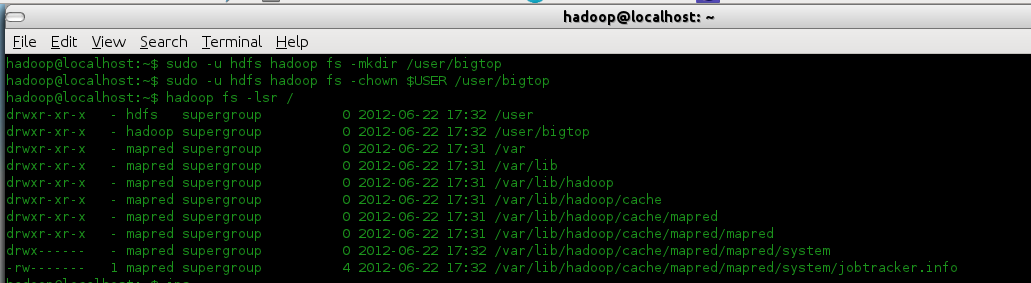
Step 3: Creating a new directory in hdfs
sudo -u hdfs hadoop fs -mkdir /user/bigtop
bigtop is the directory name in the user $USER
sudo -u hdfs hadoop fs -chown $USER /user/bigtop
Image :
Create a directory in HDFS


Step 4: List the directories in file system
hadoop fs -lsr /
Image :
HDFS directories


Step 5: Running a sample pi example
hadoop jar /usr/lib/hadoop/hadoop-examples.jar pi 10 1000
Image :
Running a sample program

Job Completed!


Enjoy with your cluster! :)
We shall see what more blending could be done with Hadoop (with Hive, Hbase, etc.) in the next post!
Until then, 
Happy Learning!! :):)